> ## Documentation Index
> Fetch the complete documentation index at: https://docs.augent.app/llms.txt
> Use this file to discover all available pages before exploring further.
# Memory
> How Augent remembers everything your agents have ever heard.
Augent remembers every file it processes. Every file that passes through the pipeline is stored permanently in a local SQLite database, indexed by content hash, and instantly retrievable by any tool. The first time you process a file, Augent does the work. Every time after that, the result is returned in milliseconds.
That's why Augent stays fast at scale. A 2-hour podcast takes minutes to transcribe the first time. The hundredth search across that same file takes zero seconds.
***
## How it works
When any tool processes an audio file (`transcribe_audio`, `search_audio`, `deep_search`, `take_notes`, or any other), the pipeline follows the same path:
1. **Hash the file.** Augent computes a SHA-256 hash of the raw audio content. This uniquely identifies the file regardless of its name or location.
2. **Check memory.** The hash + model size is looked up in the database. If a match exists, the stored result is returned immediately. No transcription runs.
3. **Transcribe and store.** If no match exists, faster-whisper runs the transcription locally. The full result (text, word-level timestamps, segments, language, duration) is written to memory.
4. **Every subsequent operation is instant.** Search, semantic analysis, chapter detection, notes, batch processing. All operate on the stored transcript without re-processing.
```mermaid theme={null}
%%{init: {'theme': 'dark'}}%%
flowchart LR
A["Audio File"] --> B["SHA-256 Hash"]
B --> C{"In Memory?"}
C -- Yes --> D["Return Instantly"]
C -- No --> E["Transcribe"]
E --> F["Store in Memory"]
F --> D
```
***
## Four layers of memory
Augent stores four types of data, all in the same SQLite database at `~/.augent/memory/transcriptions.db`:
| Layer | What it stores | Used by | Keyed by |
| ------------------ | -------------------------------------------------------- | ------------------------- | --------------------------- |
| **Transcriptions** | Full text, word timestamps, segments, language, duration | All tools | File hash + model size |
| **Embeddings** | Sentence-level vector embeddings (float32) | `deep_search`, `chapters` | File hash + embedding model |
| **Diarization** | Speaker labels, turn boundaries | `identify_speakers` | File hash + speaker count |
| **Source URLs** | YouTube/video URLs mapped to audio files | All search tools, Web UI | File hash |
Each layer is populated on first use and shared across tools. When `deep_search` computes embeddings for a file, `chapters` reuses them instantly with no recomputation. When `identify_speakers` labels a recording, the result is available for any future query.
In addition to the database, every transcription writes a human-readable `.md` file to `~/.augent/memory/transcriptions/`. These are browsable directly in your file system or in Obsidian. Translated transcriptions get a sibling `(eng)` file alongside the original (e.g., `My Video.md` + `My Video (eng).md`).
***
## What triggers a memory hit
Memory lookups are based on **file content**, not filenames. Renaming a file, moving it to a different directory, or downloading it again from the same URL all result in the same hash and the same instant memory hit.
| Scenario | Memory hit? |
| ------------------------------------- | ---------------------- |
| Same file, same model | Yes, instant |
| Same file, different name or location | Yes, same hash |
| Same file, different model size | No, new transcription |
| Modified file (even 1 byte) | No, different hash |
| Re-downloaded from same URL | Yes, identical content |
This means you can build workflows that touch the same files repeatedly (searching, re-searching, analyzing from different angles) without ever waiting for transcription again.
***
## How memory connects to every tool
Memory isn't a separate feature. It's why every other tool is fast.
**Download + Transcribe + Search:** The first prompt triggers all three stages. The second prompt skips download (file exists) and transcription (hash match), going straight to search.
**Batch processing:** When `batch_search` processes 20 files, any file that's been transcribed before returns instantly. Only new files run through the pipeline. Process a library of 100 episodes, add 5 more next week, and only the 5 new ones get transcribed.
**Semantic search and chapters:** `deep_search`, `chapters`, and `search_memory` (semantic mode) all use sentence embeddings. The first tool to run on a file computes and stores the embeddings. The second tool retrieves them from memory. This means running `deep_search` followed by `chapters` on the same file does the embedding work once, not twice.
**Cross-memory search:** `search_memory` queries everything Augent has ever stored in a single call. No file path needed. Keyword mode scans segment text directly; semantic mode searches by meaning across all files at once.
**Speaker identification:** `identify_speakers` stores diarization results. Ask "who said what" on a meeting recording once, and the speaker labels are available instantly for any future query on that file.
**Note-taking:** `take_notes` checks memory before transcribing. If you've already searched or transcribed the same URL, notes are generated from the stored transcript without re-processing.
***
## Source URL persistence
When audio is downloaded from any URL — YouTube, Twitter/X, TikTok, Instagram, SoundCloud, and 1000+ sites — via `download_audio`, the CLI, or the Web UI, the source URL is permanently stored in memory, keyed by the audio file's content hash.
This means:
* **Automatic source linking.** Any future search or transcription of that file links back to the original source. For YouTube, this means clickable timestamps. No manual entry needed.
* **Survives restarts.** The URL is stored in the database, not in memory. Restart the MCP server, reboot your machine — the link persists.
* **Path-independent.** Move the file, rename it, upload it from a different location. The content hash matches, and the source URL is found.
* **Works everywhere.** MCP tools, CLI, and the Web UI all check the same lookup chain: in-memory cache → per-transcription record → persistent source URL table.
The `.md` transcription files saved to `~/.augent/memory/transcriptions/` also include the source URL in their metadata header when available.
Downloaded a video months ago and lost the URL? If Augent ever downloaded it, the URL is already stored. Search or transcribe the file again and the source is linked automatically.
***
## Managing memory
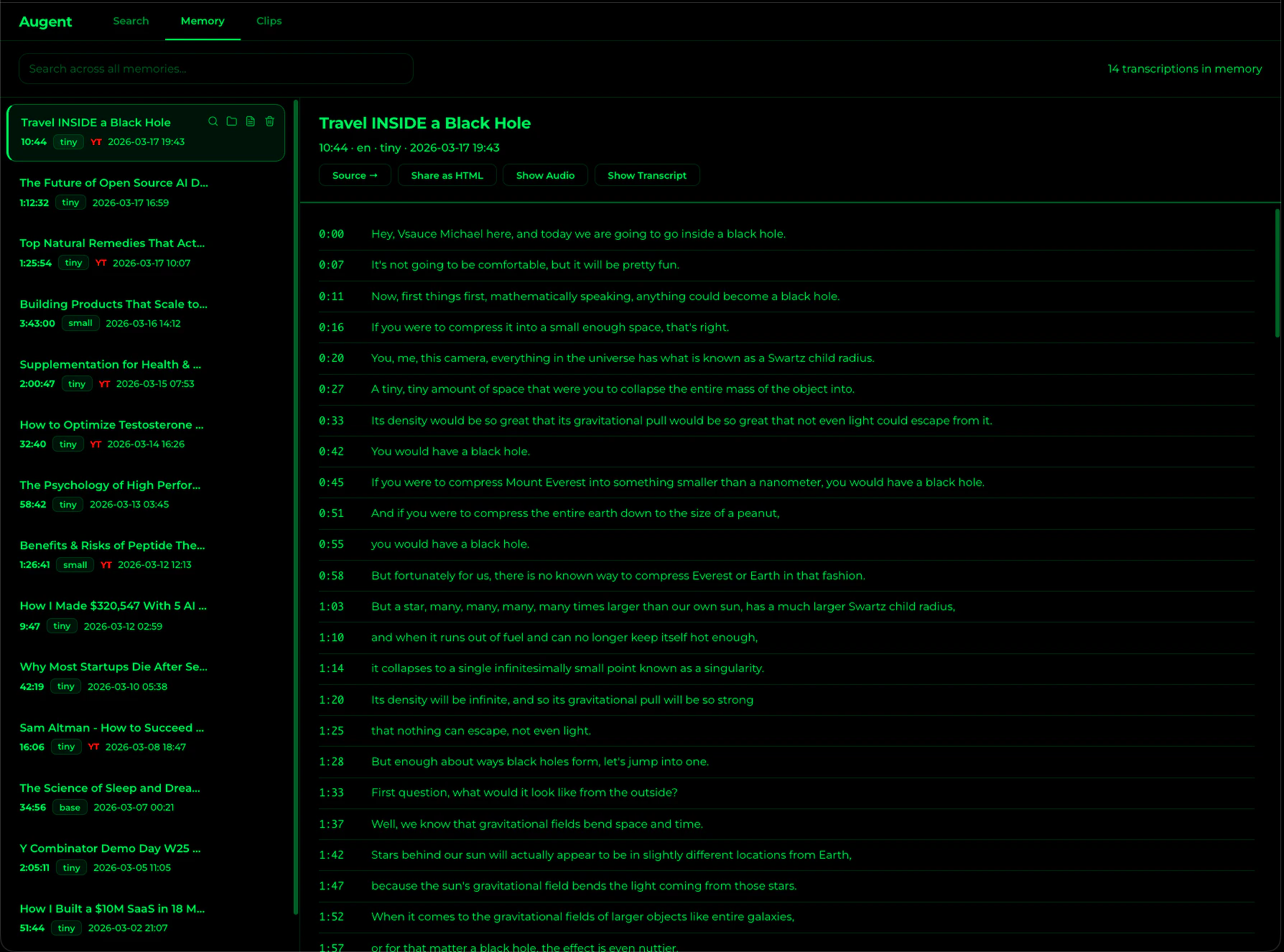 **Web UI:** The Memory Explorer in the Web UI lets you browse, search, view, and delete individual transcriptions directly from the browser. Each entry has a trash icon for deletion with a confirmation dialog.
**MCP and CLI:** Four tools let you search, inspect, and manage what Augent remembers:
Search across ALL stored transcriptions by keyword or meaning. No audio\_path needed.
Browse all stored transcriptions with titles, durations, and dates.
See total entries, hours of audio stored, and disk usage.
Wipe all stored data: transcriptions, embeddings, and diarization.
These are also available via the CLI:
```bash theme={null}
augent memory search "cold email" # Keyword search across all transcriptions
augent memory search "how to get first customers" --semantic # Meaning-based search
augent memory list # Browse stored transcriptions
augent memory stats # View storage statistics
augent memory clear # Clear everything
```
***
## Storage details
All data lives under `~/.augent/memory/`:
```
~/.augent/memory/
├── transcriptions.db # SQLite database (all four layers)
└── transcriptions/ # Human-readable .md files
├── The_Future_of_Open_Source_AI.md
├── Episode_47_AI_in_Healthcare.md
├── Chinese_Lecture.md
├── Chinese_Lecture__eng_.md # English translation sibling
└── ...
```
Titles are derived from filenames. Since `download_audio` uses yt-dlp (with the format `%(title)s [%(id)s].%(ext)s`), downloaded videos are automatically named by their video title and ID, so your memory is browsable by content name and filename collisions are prevented.
Memory is local-only. Nothing is uploaded, synced, or shared. Everything stays on your machine in a single SQLite file you can back up, move, or delete at any time.
**Web UI:** The Memory Explorer in the Web UI lets you browse, search, view, and delete individual transcriptions directly from the browser. Each entry has a trash icon for deletion with a confirmation dialog.
**MCP and CLI:** Four tools let you search, inspect, and manage what Augent remembers:
Search across ALL stored transcriptions by keyword or meaning. No audio\_path needed.
Browse all stored transcriptions with titles, durations, and dates.
See total entries, hours of audio stored, and disk usage.
Wipe all stored data: transcriptions, embeddings, and diarization.
These are also available via the CLI:
```bash theme={null}
augent memory search "cold email" # Keyword search across all transcriptions
augent memory search "how to get first customers" --semantic # Meaning-based search
augent memory list # Browse stored transcriptions
augent memory stats # View storage statistics
augent memory clear # Clear everything
```
***
## Storage details
All data lives under `~/.augent/memory/`:
```
~/.augent/memory/
├── transcriptions.db # SQLite database (all four layers)
└── transcriptions/ # Human-readable .md files
├── The_Future_of_Open_Source_AI.md
├── Episode_47_AI_in_Healthcare.md
├── Chinese_Lecture.md
├── Chinese_Lecture__eng_.md # English translation sibling
└── ...
```
Titles are derived from filenames. Since `download_audio` uses yt-dlp (with the format `%(title)s [%(id)s].%(ext)s`), downloaded videos are automatically named by their video title and ID, so your memory is browsable by content name and filename collisions are prevented.
Memory is local-only. Nothing is uploaded, synced, or shared. Everything stays on your machine in a single SQLite file you can back up, move, or delete at any time.