> ## Documentation Index
> Fetch the complete documentation index at: https://docs.augent.app/llms.txt
> Use this file to discover all available pages before exploring further.
# Obsidian Setup
> Make every .txt and .md file on your Mac open directly in Obsidian.
 Claude Code and Codex can already edit files inside your Obsidian vault. The bottleneck is macOS: it prevents you from setting Obsidian as the default opener for `.txt` and `.md` files.
**The problems:**
* **macOS prevents setting Obsidian as the default opener** for `.txt` and `.md` files
* **Files outside your vault** don't show up in Obsidian at all
* **External edits** from Claude or Codex can go stale without a background watcher
**What this setup fixes:**
* **Every `.txt` and `.md`** on your Mac opens directly in Obsidian
* **External files** are hard-linked into your vault automatically
* **A background service** keeps everything in sync and auto-restarts if it stops
Source code, setup script, and full docs. Open source, auditable, runs locally.
**Two ways to give Claude or Codex files:**
* **Drag and drop** files or folders directly into the Claude Code or Codex prompt
* **Copy the path** from Obsidian: right-click a file's tab or sidebar entry > **Copy path** > **from system root**
***
## Setup
Two steps: configure Obsidian (manual), then install (pick one of two options).
**Requirements:** macOS and [Obsidian](https://obsidian.md) with at least one vault. The setup script handles everything else automatically.
### Step 1: Configure Obsidian
Do this before running either install option.
**1. Enable community plugins:**
* Settings (gear icon) > **Community plugins** > **Turn on community plugins**
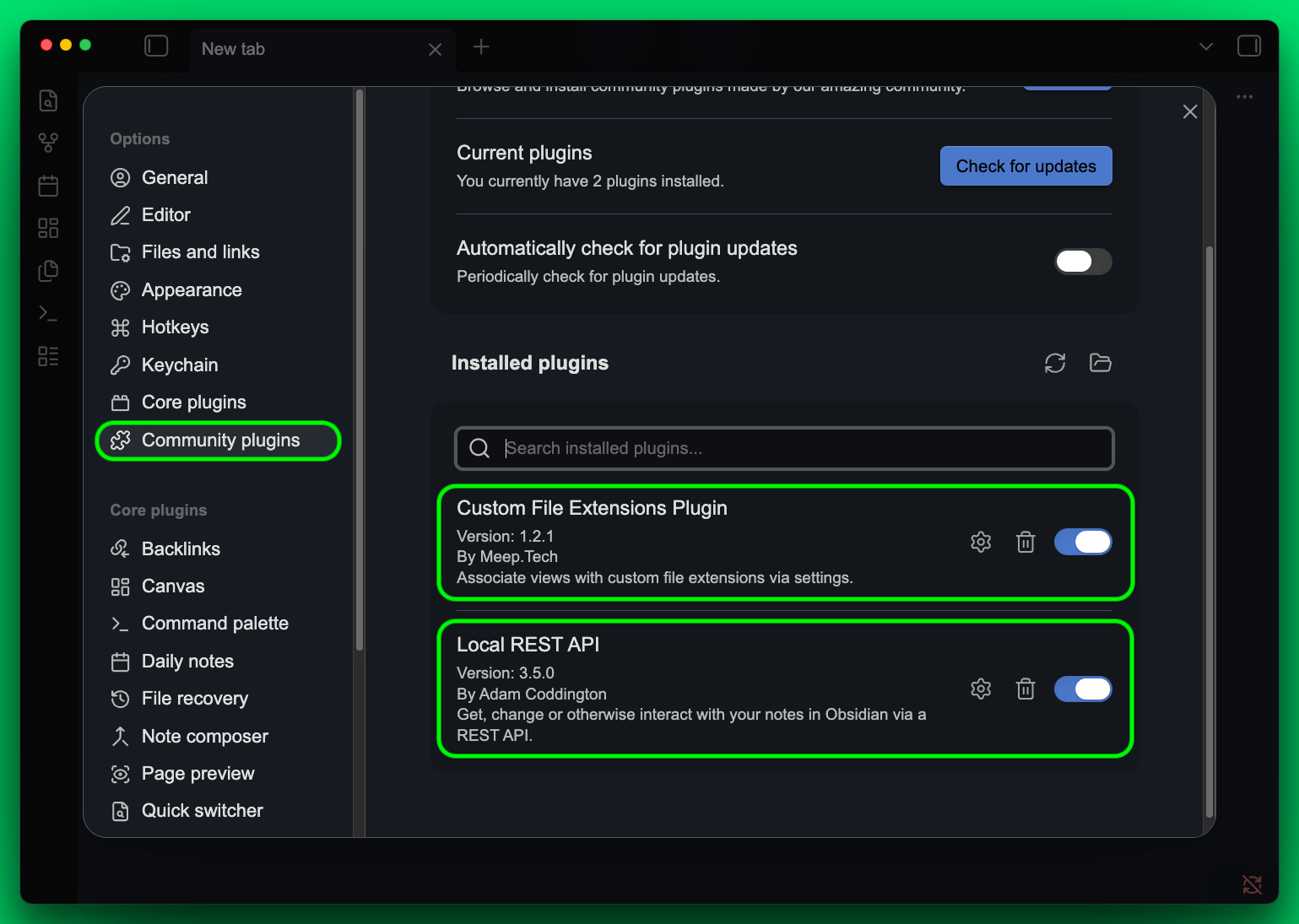
**2. Install "Custom File Extensions" plugin (required):**
* Click here to open it in Obsidian, or search "Custom File Extensions" by MeepTech in Community plugins
* Click **Install**, then **Enable**
**3. Install "Local REST API" plugin (recommended):**
* Click here to open it in Obsidian, or search "Local REST API" by Adam Coddington in Community plugins
* Click **Install**, then **Enable**
* Adds REST endpoints for searching, reading, and automating your vault. Not required, but valuable for power users.
The screenshot shows both plugins installed and enabled. Custom File Extensions is required. Local REST API is recommended but not necessary:
Claude Code and Codex can already edit files inside your Obsidian vault. The bottleneck is macOS: it prevents you from setting Obsidian as the default opener for `.txt` and `.md` files.
**The problems:**
* **macOS prevents setting Obsidian as the default opener** for `.txt` and `.md` files
* **Files outside your vault** don't show up in Obsidian at all
* **External edits** from Claude or Codex can go stale without a background watcher
**What this setup fixes:**
* **Every `.txt` and `.md`** on your Mac opens directly in Obsidian
* **External files** are hard-linked into your vault automatically
* **A background service** keeps everything in sync and auto-restarts if it stops
Source code, setup script, and full docs. Open source, auditable, runs locally.
**Two ways to give Claude or Codex files:**
* **Drag and drop** files or folders directly into the Claude Code or Codex prompt
* **Copy the path** from Obsidian: right-click a file's tab or sidebar entry > **Copy path** > **from system root**
***
## Setup
Two steps: configure Obsidian (manual), then install (pick one of two options).
**Requirements:** macOS and [Obsidian](https://obsidian.md) with at least one vault. The setup script handles everything else automatically.
### Step 1: Configure Obsidian
Do this before running either install option.
**1. Enable community plugins:**
* Settings (gear icon) > **Community plugins** > **Turn on community plugins**
**2. Install "Custom File Extensions" plugin (required):**
* Click here to open it in Obsidian, or search "Custom File Extensions" by MeepTech in Community plugins
* Click **Install**, then **Enable**
**3. Install "Local REST API" plugin (recommended):**
* Click here to open it in Obsidian, or search "Local REST API" by Adam Coddington in Community plugins
* Click **Install**, then **Enable**
* Adds REST endpoints for searching, reading, and automating your vault. Not required, but valuable for power users.
The screenshot shows both plugins installed and enabled. Custom File Extensions is required. Local REST API is recommended but not necessary:
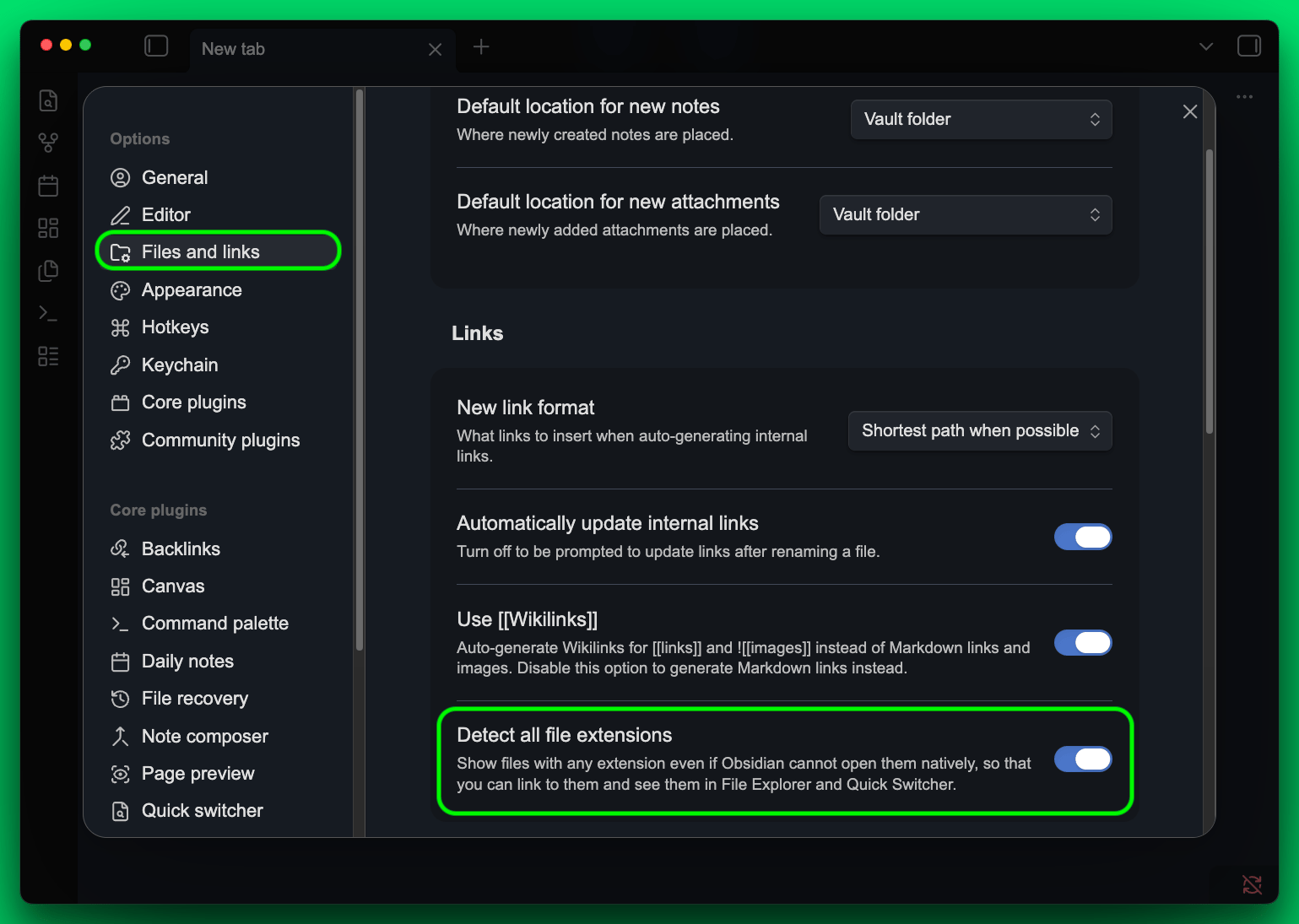
 **4. Enable "Detect all file extensions":**
* Settings > **Files & Links** > toggle **Detect all file extensions** ON
**4. Enable "Detect all file extensions":**
* Settings > **Files & Links** > toggle **Detect all file extensions** ON
 **5. Restart Obsidian** (quit fully and reopen).
### Step 2: Install
Two options. Both produce the same result.
#### Option A: One-liner (recommended)
One command. Auto-detects your vault, compiles two native macOS apps from source, registers file handlers, and installs a background service that keeps everything running.
```bash theme={null}
curl -fsSL https://augent.app/obsidian.sh | bash
```
Or clone and run manually:
```bash theme={null}
git clone https://github.com/AugentDevs/augent-obsidian.git
cd augent-obsidian
bash setup.sh
```
#### Option B: Paste into Claude Code
Only works on Claude Code CLI (Claude Code in your terminal).
If you prefer not to clone a repo, expand the section below, copy the full snippet, paste it into Claude Code, and say **"Run this setup"**.
**5. Restart Obsidian** (quit fully and reopen).
### Step 2: Install
Two options. Both produce the same result.
#### Option A: One-liner (recommended)
One command. Auto-detects your vault, compiles two native macOS apps from source, registers file handlers, and installs a background service that keeps everything running.
```bash theme={null}
curl -fsSL https://augent.app/obsidian.sh | bash
```
Or clone and run manually:
```bash theme={null}
git clone https://github.com/AugentDevs/augent-obsidian.git
cd augent-obsidian
bash setup.sh
```
#### Option B: Paste into Claude Code
Only works on Claude Code CLI (Claude Code in your terminal).
If you prefer not to clone a repo, expand the section below, copy the full snippet, paste it into Claude Code, and say **"Run this setup"**.
Copy the entire text below, paste it into Claude Code, and say **"Run this setup"**.
```text theme={null}
OBSIDIAN FILE SETUP - BUILD INSTRUCTIONS FOR CLAUDE
===================================================================
Follow every step in order. Detect what you can automatically.
Only ask when you genuinely cannot determine something.
WHAT YOU ARE BUILDING:
Double-clicking any .txt or .md file on macOS opens it in Obsidian
with real-time sync for external edits. Works for files anywhere on
the filesystem, not just inside the vault. Survives file moves within
Obsidian. No dock icon flash, no dialogs, opens near-instantly.
THE SYSTEM HAS 5 PIECES:
[1] "Open in Obsidian.app" — native Swift binary, default .txt and .md handler
[2] "Obsidian File Watcher.app" — native Swift binary, re-links on edit
[3] Custom File Extensions plugin — lets Obsidian render .txt as markdown
[4] "Detect all file extensions" — Obsidian setting so .txt shows in sidebar
[5] duti — CLI tool that sets the default file handler
[6] Local REST API plugin (recommended) — REST interface for searching, reading, and automating your vault
PRODUCTION FEATURES:
- Cross-volume support: auto-falls back to symlinks when hard links fail
- Filename collision handling: disambiguates with parent directory name
- Map file locking: POSIX flock() prevents corruption from concurrent access
- Event-driven watcher: native Swift with DispatchSource (not polling AppleScript)
- Rapid open handling: exit timer allows burst file opens without drops
=====================================================================
STEP 0: DETECT ENVIRONMENT
=====================================================================
Run these commands FIRST to detect the user's setup automatically.
USERNAME:
whoami
VAULT PATH — auto-detect:
find ~/Desktop ~/Documents ~/ -maxdepth 3 -name ".obsidian" -type d 2>/dev/null | head -5
Each result is a vault — the PARENT directory of each .obsidian/ found.
If exactly one vault is found, use it automatically.
If multiple vaults are found, ask the user which one to use.
If NO vault is found, ask the user for their vault path.
Store the vault path WITHOUT trailing slash. Example:
/Users/joe/Desktop/MyVault
Throughout these instructions, replace with this path.
In the Swift source code, replace VAULT_PATH_HERE with this path.
VERIFY OBSIDIAN IS INSTALLED:
ls /Applications/Obsidian.app
If Obsidian is not found, STOP and tell the user to install Obsidian
first, create a vault, and then re-run this setup.
=====================================================================
STEP 1: INSTALL PREREQUISITES
=====================================================================
Check and install each dependency:
HOMEBREW:
which brew
If missing → STOP. Tell user to install Homebrew: https://brew.sh
DUTI:
which duti
If missing → brew install duti
SWIFT COMPILER:
which swiftc
If missing → xcode-select --install
(This opens a macOS GUI dialog. Tell the user to click "Install"
and wait for it to finish. After install, verify: which swiftc)
If swiftc still fails with "unable to find sdk" → sudo xcode-select --reset
=====================================================================
STEP 2: CREATE VAULT DIRECTORIES AND FILES
=====================================================================
mkdir -p "/External Files"
touch "/.obsidian/hardlink-map.txt"
=====================================================================
STEP 3: BUILD "OPEN IN OBSIDIAN.APP" (native Swift)
=====================================================================
This is the core piece. A native Cocoa binary that:
- Receives Apple Events (odoc) when macOS opens a file via double-click
- If the file is inside the vault, opens it directly in Obsidian
- If outside the vault, hard-links it into /External Files/
- Falls back to symlinks for cross-volume files (e.g. external drives)
- Disambiguates filename collisions with parent directory name
- Uses flock() for safe concurrent map file access
- Handles rapid burst opens via exit timer (no dropped files)
- Uses a map file for fast repeat opens
- Runs invisibly (LSUIElement — no dock icon, no quit dialog)
3a) Write this Swift source to /tmp/OpenInObsidian.swift.
IMPORTANT: Replace VAULT_PATH_HERE with the actual vault path.
------------ BEGIN FILE: /tmp/OpenInObsidian.swift ------------
import Cocoa
class AppDelegate: NSObject, NSApplicationDelegate {
var exitTimer: DispatchSourceTimer?
func application(_ sender: NSApplication, openFiles filenames: [String]) {
processFiles(filenames)
scheduleExit()
}
func applicationDidFinishLaunching(_ notification: Notification) {
DispatchQueue.main.asyncAfter(deadline: .now() + 2.0) { [weak self] in
if self?.exitTimer == nil { exit(0) }
}
}
func scheduleExit() {
exitTimer?.cancel()
let t = DispatchSource.makeTimerSource(queue: .main)
t.schedule(deadline: .now() + 1.5)
t.setEventHandler { exit(0) }
t.resume()
exitTimer = t
}
}
func processFiles(_ files: [String]) {
let vault = "VAULT_PATH_HERE"
let extDir = vault + "/External Files"
let mapFile = vault + "/.obsidian/hardlink-map.txt"
let fm = FileManager.default
try? fm.createDirectory(atPath: extDir, withIntermediateDirectories: true)
if !fm.fileExists(atPath: mapFile) { fm.createFile(atPath: mapFile, contents: nil) }
for filepath in files {
var target = filepath
if !filepath.hasPrefix(vault) {
let attrs = try? fm.attributesOfItem(atPath: filepath)
let inode = (attrs?[.systemFileNumber] as? UInt64) ?? 0
target = ""
var linkType = "hardlink"
var newlyLinked = false
// Fast path: check map file (with lock)
let mapContent = readMapLocked(mapFile)
let prefix = filepath + "|"
for line in mapContent.components(separatedBy: "\n") {
if line.hasPrefix(prefix) {
let parts = String(line.dropFirst(prefix.count)).components(separatedBy: "|")
let mapped = parts[0]
if fm.fileExists(atPath: mapped) {
if parts.count > 1 && parts[1] == "symlink" {
target = mapped
linkType = "symlink"
} else {
let mAttrs = try? fm.attributesOfItem(atPath: mapped)
let mInode = (mAttrs?[.systemFileNumber] as? UInt64) ?? 0
if mInode == inode { target = mapped }
}
}
break
}
}
// Quick check: look in External Files by filename + inode
if target.isEmpty {
let fname = (filepath as NSString).lastPathComponent
let quickPath = extDir + "/" + fname
if fm.fileExists(atPath: quickPath) {
let qAttrs = try? fm.attributesOfItem(atPath: quickPath)
let qInode = (qAttrs?[.systemFileNumber] as? UInt64) ?? 0
if qInode == inode { target = quickPath }
}
}
// Create link if not found
if target.isEmpty {
let fname = (filepath as NSString).lastPathComponent
var linkPath = extDir + "/" + fname
// Filename collision: disambiguate with parent dir name
if fm.fileExists(atPath: linkPath) {
let existingAttrs = try? fm.attributesOfItem(atPath: linkPath)
let existingInode = (existingAttrs?[.systemFileNumber] as? UInt64) ?? 0
if existingInode != inode {
let dirName = ((filepath as NSString).deletingLastPathComponent as NSString).lastPathComponent
let base = (fname as NSString).deletingPathExtension
let ext = (fname as NSString).pathExtension
if ext.isEmpty {
linkPath = extDir + "/" + base + " (" + dirName + ")"
} else {
linkPath = extDir + "/" + base + " (" + dirName + ")." + ext
}
}
}
unlink(linkPath)
// Cross-volume fallback: try hard link, fall back to symlink
let linkResult = link(filepath, linkPath)
if linkResult != 0 {
symlink(filepath, linkPath)
linkType = "symlink"
}
target = linkPath
newlyLinked = true
}
// Update map with lock
let mapSuffix = linkType == "symlink" ? "|symlink" : ""
writeMapEntryLocked(mapFile, original: filepath, target: target, suffix: mapSuffix)
// New file in vault — give Obsidian a moment to index it
if newlyLinked { Thread.sleep(forTimeInterval: 0.3) }
}
// URL encode and open in Obsidian
if let encoded = target.addingPercentEncoding(withAllowedCharacters: CharacterSet.urlPathAllowed) {
let urlStr = "obsidian://open?path=" + encoded
if let url = URL(string: urlStr) {
NSWorkspace.shared.open(url)
}
}
}
}
func readMapLocked(_ path: String) -> String {
let fd = open(path, O_RDONLY)
guard fd >= 0 else { return "" }
defer { close(fd) }
flock(fd, LOCK_SH)
defer { flock(fd, LOCK_UN) }
let data = FileHandle(fileDescriptor: fd, closeOnDealloc: false).readDataToEndOfFile()
return String(data: data, encoding: .utf8) ?? ""
}
func writeMapEntryLocked(_ path: String, original: String, target: String, suffix: String) {
let fd = open(path, O_RDWR | O_CREAT, 0o644)
guard fd >= 0 else { return }
flock(fd, LOCK_EX)
let handle = FileHandle(fileDescriptor: fd, closeOnDealloc: false)
let data = handle.readDataToEndOfFile()
let content = String(data: data, encoding: .utf8) ?? ""
let prefix = original + "|"
var lines = content.components(separatedBy: "\n")
.filter { !$0.isEmpty && !$0.hasPrefix(prefix) }
lines.append(original + "|" + target + suffix)
let newContent = lines.joined(separator: "\n") + "\n"
handle.seek(toFileOffset: 0)
handle.write(newContent.data(using: .utf8)!)
handle.truncateFile(atOffset: UInt64(newContent.utf8.count))
flock(fd, LOCK_UN)
close(fd)
}
let app = NSApplication.shared
let delegate = AppDelegate()
app.delegate = delegate
app.run()
------------ END FILE: /tmp/OpenInObsidian.swift ------------
3b) Compile with optimizations:
swiftc -O -o /tmp/open-in-obsidian /tmp/OpenInObsidian.swift -framework Cocoa
If this fails with "unable to find sdk":
sudo xcode-select --reset
Then retry the swiftc command.
3c) Remove any old version and create the app bundle:
rm -rf "/Applications/Open in Obsidian.app"
mkdir -p "/Applications/Open in Obsidian.app/Contents/MacOS"
cp /tmp/open-in-obsidian "/Applications/Open in Obsidian.app/Contents/MacOS/open-in-obsidian"
3d) Write this Info.plist (no substitutions needed — use exactly as-is):
------------ BEGIN FILE: /Applications/Open in Obsidian.app/Contents/Info.plist ------------
CFBundleDevelopmentRegion
en
CFBundleExecutable
open-in-obsidian
CFBundleIdentifier
com.local.open-in-obsidian
CFBundleInfoDictionaryVersion
6.0
CFBundleName
Open in Obsidian
CFBundlePackageType
APPL
CFBundleShortVersionString
5.0
CFBundleVersion
5
LSUIElement
CFBundleDocumentTypes
CFBundleTypeName
Plain Text
CFBundleTypeExtensions
txt
text
LSItemContentTypes
public.plain-text
CFBundleTypeRole
Editor
LSHandlerRank
Owner
CFBundleTypeName
Markdown
CFBundleTypeExtensions
md
markdown
LSItemContentTypes
net.daringfireball.markdown
CFBundleTypeRole
Editor
LSHandlerRank
Owner
------------ END FILE ------------
3e) Sign, clear quarantine, register with macOS, set as default handler:
codesign --force --deep --sign - "/Applications/Open in Obsidian.app"
xattr -cr "/Applications/Open in Obsidian.app"
/System/Library/Frameworks/CoreServices.framework/Frameworks/LaunchServices.framework/Support/lsregister -f "/Applications/Open in Obsidian.app"
duti -s com.local.open-in-obsidian public.plain-text all
duti -s com.local.open-in-obsidian .txt all
duti -s com.local.open-in-obsidian com.apple.traditional-mac-plain-text all
duti -s com.local.open-in-obsidian net.daringfireball.markdown all
duti -s com.local.open-in-obsidian .md all
3f) Verify:
duti -x txt
MUST show "Open in Obsidian" and "com.local.open-in-obsidian".
If it still shows TextEdit, re-run the lsregister and duti commands
from 3e and check again.
duti -x md
MUST show "Open in Obsidian" and "com.local.open-in-obsidian".
If it still shows Xcode, re-run the lsregister and duti commands
from 3e and check again.
=====================================================================
STEP 4: BUILD "OBSIDIAN FILE WATCHER.APP" (native Swift)
=====================================================================
This background app monitors the map file and re-links broken hard links.
When an external editor does an atomic write (new inode), the hard link
breaks. The watcher detects the inode mismatch every 2 seconds and
re-creates the hard link so Obsidian sees the updated content.
Built as a native Swift binary using DispatchSource for event-driven
file monitoring. Uses flock() for safe concurrent map file access.
Skips symlinked entries (symlinks survive atomic writes automatically).
4a) Write this Swift source to /tmp/ObsidianFileWatcher.swift.
IMPORTANT: Replace VAULT_PATH_HERE with the actual vault path.
------------ BEGIN FILE: /tmp/ObsidianFileWatcher.swift ------------
import Cocoa
let vault = "VAULT_PATH_HERE"
let mapFile = vault + "/.obsidian/hardlink-map.txt"
let fm = FileManager.default
class WatcherDelegate: NSObject, NSApplicationDelegate {
var mapSource: DispatchSourceFileSystemObject?
var timer: DispatchSourceTimer?
var mapFd: Int32 = -1
func applicationDidFinishLaunching(_ notification: Notification) {
try? fm.createDirectory(atPath: vault + "/.obsidian", withIntermediateDirectories: true)
if !fm.fileExists(atPath: mapFile) { fm.createFile(atPath: mapFile, contents: nil) }
watchMapFile()
scheduleCheck()
}
func watchMapFile() {
if mapFd >= 0 { close(mapFd) }
mapFd = open(mapFile, O_EVTONLY)
guard mapFd >= 0 else { return }
mapSource?.cancel()
let source = DispatchSource.makeFileSystemObjectSource(
fileDescriptor: mapFd,
eventMask: [.write, .rename, .delete],
queue: .main
)
source.setEventHandler { [weak self] in
let flags = source.data
if flags.contains(.delete) || flags.contains(.rename) {
self?.mapSource?.cancel()
self?.mapSource = nil
if self?.mapFd ?? -1 >= 0 { close(self!.mapFd); self?.mapFd = -1 }
DispatchQueue.main.asyncAfter(deadline: .now() + 0.5) {
self?.watchMapFile()
}
}
}
source.setCancelHandler { [weak self] in
if self?.mapFd ?? -1 >= 0 { close(self!.mapFd); self?.mapFd = -1 }
}
source.resume()
mapSource = source
}
func scheduleCheck() {
let t = DispatchSource.makeTimerSource(queue: .main)
t.schedule(deadline: .now() + 2, repeating: 2.0)
t.setEventHandler { [weak self] in
self?.checkAndRelink()
}
t.resume()
timer = t
}
func checkAndRelink() {
let fd = open(mapFile, O_RDONLY)
guard fd >= 0 else { return }
flock(fd, LOCK_SH)
let data = FileHandle(fileDescriptor: fd, closeOnDealloc: false).readDataToEndOfFile()
flock(fd, LOCK_UN)
close(fd)
let content = String(data: data, encoding: .utf8) ?? ""
let lines = content.components(separatedBy: "\n").filter { !$0.isEmpty }
if lines.isEmpty { return }
var updatedLines: [String] = []
var changed = false
for line in lines {
let firstPipe = line.firstIndex(of: "|")
guard let pipeIdx = firstPipe else { updatedLines.append(line); continue }
let orig = String(line[line.startIndex.. 1 && restParts[1] == "symlink"
if isSymlink { updatedLines.append(line); continue }
guard fm.fileExists(atPath: orig) else { updatedLines.append(line); continue }
if !fm.fileExists(atPath: vfile) {
let fname = (vfile as NSString).lastPathComponent
let pipe = Pipe()
let proc = Process()
proc.executableURL = URL(fileURLWithPath: "/usr/bin/find")
proc.arguments = [vault, "-not", "-path", "*/.obsidian/*", "-name", fname, "-type", "f", "-print", "-quit"]
proc.standardOutput = pipe
proc.standardError = FileHandle.nullDevice
try? proc.run()
proc.waitUntilExit()
let found = String(data: pipe.fileHandleForReading.readDataToEndOfFile(), encoding: .utf8)?
.trimmingCharacters(in: .whitespacesAndNewlines) ?? ""
if !found.isEmpty {
vfile = found
changed = true
} else {
updatedLines.append(line)
continue
}
}
let origAttrs = try? fm.attributesOfItem(atPath: orig)
let vfileAttrs = try? fm.attributesOfItem(atPath: vfile)
let origInode = (origAttrs?[.systemFileNumber] as? UInt64) ?? 0
let vfileInode = (vfileAttrs?[.systemFileNumber] as? UInt64) ?? 0
if origInode != vfileInode {
let origMod = (origAttrs?[.modificationDate] as? Date) ?? .distantPast
let vfileMod = (vfileAttrs?[.modificationDate] as? Date) ?? .distantPast
if vfileMod > origMod {
unlink(orig)
link(vfile, orig)
} else {
unlink(vfile)
link(orig, vfile)
}
changed = true
}
updatedLines.append(orig + "|" + vfile)
}
if changed {
let wfd = open(mapFile, O_RDWR | O_CREAT, 0o644)
guard wfd >= 0 else { return }
flock(wfd, LOCK_EX)
let handle = FileHandle(fileDescriptor: wfd, closeOnDealloc: false)
let newContent = updatedLines.joined(separator: "\n") + "\n"
handle.seek(toFileOffset: 0)
handle.write(newContent.data(using: .utf8)!)
handle.truncateFile(atOffset: UInt64(newContent.utf8.count))
flock(wfd, LOCK_UN)
close(wfd)
}
}
}
let app = NSApplication.shared
let delegate = WatcherDelegate()
app.delegate = delegate
app.run()
------------ END FILE: /tmp/ObsidianFileWatcher.swift ------------
4b) Compile:
swiftc -O -o /tmp/obsidian-file-watcher /tmp/ObsidianFileWatcher.swift -framework Cocoa
4c) Remove any old version and create the app bundle:
rm -rf "/Applications/Obsidian File Watcher.app"
mkdir -p "/Applications/Obsidian File Watcher.app/Contents/MacOS"
cp /tmp/obsidian-file-watcher "/Applications/Obsidian File Watcher.app/Contents/MacOS/obsidian-file-watcher"
4d) Write this Info.plist (no substitutions needed — use exactly as-is):
------------ BEGIN FILE: /Applications/Obsidian File Watcher.app/Contents/Info.plist ------------
CFBundleDevelopmentRegion
en
CFBundleExecutable
obsidian-file-watcher
CFBundleIdentifier
com.local.obsidian-file-watcher
CFBundleInfoDictionaryVersion
6.0
CFBundleName
Obsidian File Watcher
CFBundlePackageType
APPL
CFBundleShortVersionString
3.0
CFBundleVersion
3
LSUIElement
------------ END FILE ------------
4e) Sign and clear quarantine:
codesign --force --deep --sign - "/Applications/Obsidian File Watcher.app"
xattr -cr "/Applications/Obsidian File Watcher.app"
=====================================================================
STEP 5: INSTALL WATCHER AS LAUNCHD AGENT
=====================================================================
Create a LaunchAgent plist so macOS auto-starts the watcher on login
and auto-restarts it if it crashes. This replaces the old login items
approach which was unreliable.
Write this plist to ~/Library/LaunchAgents/com.local.obsidian-file-watcher.plist:
Label
com.local.obsidian-file-watcher
ProgramArguments
/Applications/Obsidian File Watcher.app/Contents/MacOS/obsidian-file-watcher
RunAtLoad
KeepAlive
StandardOutPath
/tmp/obsidian-file-watcher.log
StandardErrorPath
/tmp/obsidian-file-watcher.log
Then load it:
launchctl unload ~/Library/LaunchAgents/com.local.obsidian-file-watcher.plist 2>/dev/null
pkill -f "obsidian-file-watcher" 2>/dev/null
sleep 1
launchctl load ~/Library/LaunchAgents/com.local.obsidian-file-watcher.plist
Verify it's running:
ps aux | grep obsidian-file-watcher | grep -v grep
→ Must show the native binary running
=====================================================================
STEP 6: TEST THE BUILD
=====================================================================
echo "Hello from setup test" > /tmp/obsidian-test-file.txt
open /tmp/obsidian-test-file.txt
Wait 2-3 seconds, then verify ALL of these:
a) duti -x txt
→ Must show "Open in Obsidian" and "com.local.open-in-obsidian"
b) ls -la "/External Files/obsidian-test-file.txt"
→ File must exist with link count of 2
c) cat "/.obsidian/hardlink-map.txt"
→ Must have an entry for /private/tmp/obsidian-test-file.txt
d) ps aux | grep obsidian-file-watcher | grep -v grep
→ Must show the native binary running (NOT osascript)
If any of these fail, see TROUBLESHOOTING at the bottom.
Now test .md files:
e) echo "# Markdown test" > /tmp/obsidian-test-file.md
open /tmp/obsidian-test-file.md
f) duti -x md
→ Must show "Open in Obsidian" and "com.local.open-in-obsidian"
g) ls -la "/External Files/obsidian-test-file.md"
→ File must exist with link count of 2
If any of these fail, see TROUBLESHOOTING at the bottom.
Clean up:
rm -f /tmp/obsidian-test-file.txt /tmp/obsidian-test-file.md
=====================================================================
STEP 7: VERIFY OBSIDIAN PLUGINS (user did this before pasting)
=====================================================================
The user was instructed to install the plugins BEFORE pasting this
into Claude Code. Verify everything is in place. If anything is
missing, walk them through the specific step they missed.
VERIFY COMMUNITY PLUGINS ARE ENABLED:
cat "/.obsidian/community-plugins.json"
→ Must contain "obsidian-custom-file-extensions-plugin"
If missing "obsidian-custom-file-extensions-plugin":
Tell user: Open Obsidian → Settings → Community plugins → Browse →
search "Custom File Extensions" (by MeepTech) → Install → Enable
VERIFY "DETECT ALL FILE EXTENSIONS" IS ON:
cat "/.obsidian/app.json"
→ Must contain "showUnsupportedFiles": true
If missing:
Tell user: Obsidian → Settings → Files & Links →
toggle "Detect all file extensions" ON
If installed (recommended but optional):
VERIFY LOCAL REST API IS RUNNING:
cat "/.obsidian/community-plugins.json"
→ Check if "obsidian-local-rest-api" is present
If present, verify it is running:
curl -s --insecure https://localhost:27124 | head -1
→ Must return JSON with "status": "OK"
If not responding:
Tell user: restart Obsidian, then verify the Local REST API
plugin is enabled under Settings → Community plugins.
VERIFY API KEY EXISTS:
cat "/.obsidian/plugins/obsidian-local-rest-api/data.json" | python3 -c "import json,sys; print(json.load(sys.stdin)['apiKey'][:8]+'...')"
→ Must print the first 8 chars of the API key
If missing: the plugin was installed but never enabled. Tell the
user to enable it in Obsidian, restart Obsidian, then re-verify.
ALL CHECKS PASSED → setup complete.
GRANT FULL DISK ACCESS TO BOTH APPS:
Tell the user:
- Open System Settings → Privacy & Security → Full Disk Access
- If "Open in Obsidian" is listed, toggle it ON
- If NOT listed: click +, navigate to /Applications,
select "Open in Obsidian.app", toggle it ON
- If "Obsidian File Watcher" is listed, toggle it ON
- If NOT listed: click +, navigate to /Applications,
select "Obsidian File Watcher.app", toggle it ON
- Full Disk Access is REQUIRED for both apps to detect and handle
external file changes across all directories
=====================================================================
TROUBLESHOOTING
=====================================================================
PROBLEM: "duti -x txt" still shows TextEdit
FIX:
/System/Library/Frameworks/CoreServices.framework/Frameworks/LaunchServices.framework/Support/lsregister -f "/Applications/Open in Obsidian.app"
duti -s com.local.open-in-obsidian public.plain-text all
duti -s com.local.open-in-obsidian .txt all
duti -s com.local.open-in-obsidian com.apple.traditional-mac-plain-text all
Then verify: duti -x txt
PROBLEM: "duti -x md" still shows Xcode
FIX:
/System/Library/Frameworks/CoreServices.framework/Frameworks/LaunchServices.framework/Support/lsregister -f "/Applications/Open in Obsidian.app"
duti -s com.local.open-in-obsidian net.daringfireball.markdown all
duti -s com.local.open-in-obsidian .md all
Then verify: duti -x md
PROBLEM: swiftc fails with "unable to find sdk" or "no developer tools"
FIX:
sudo xcode-select --reset
If that doesn't work: xcode-select --install (then wait for install)
Then retry the swiftc command.
PROBLEM: File opens but Obsidian shows "cannot open this file type"
FIX:
The Custom File Extensions plugin is not installed or not enabled.
Walk the user through Step 7 items 1 and 2 again.
Verify: cat "/.obsidian/community-plugins.json"
PROBLEM: .txt files don't appear in Obsidian's sidebar
FIX:
"Detect all file extensions" is not enabled.
Walk the user through Step 7 item 3.
Verify: cat "/.obsidian/app.json" should show
"showUnsupportedFiles": true
PROBLEM: External edits (from Claude, Codex, or terminal) don't appear in Obsidian
FIX:
The File Watcher may not be running.
Check if running: ps aux | grep obsidian-file-watcher | grep -v grep
If not running: re-run bash setup.sh to install the launchd agent
that auto-starts and auto-restarts the watcher.
If running but not syncing: Full Disk Access is not granted.
Walk the user through the Full Disk Access step in Step 7.
PROBLEM: macOS shows permission dialogs when accessing Desktop/Documents
FIX:
Click "Allow" on any macOS permission prompts. Both Obsidian and
the Open in Obsidian app may need access to Desktop, Documents,
or Downloads depending on where .txt files are located.
PROBLEM: codesign fails or app won't launch
FIX:
xattr -cr "/Applications/Open in Obsidian.app"
codesign --force --deep --sign - "/Applications/Open in Obsidian.app"
If still failing, try: spctl --add "/Applications/Open in Obsidian.app"
PROBLEM: "open -a" says "Unable to find application"
FIX:
/System/Library/Frameworks/CoreServices.framework/Frameworks/LaunchServices.framework/Support/lsregister -f "/Applications/Open in Obsidian.app"
Wait 2 seconds, then retry.
TO REVERT EVERYTHING:
launchctl unload ~/Library/LaunchAgents/com.local.obsidian-file-watcher.plist 2>/dev/null
rm -f ~/Library/LaunchAgents/com.local.obsidian-file-watcher.plist
duti -s com.apple.TextEdit public.plain-text all
duti -s com.apple.dt.Xcode net.daringfireball.markdown all
rm -rf "/Applications/Open in Obsidian.app"
rm -rf "/Applications/Obsidian File Watcher.app"
=====================================================================
HOW THE SYSTEM WORKS (reference)
=====================================================================
- User double-clicks .txt or .md file anywhere on their Mac
- macOS sends "open document" Apple Event to Open in Obsidian.app
(the default handler, set via duti)
- Native Swift binary launches invisibly (LSUIElement, no dock icon)
- NSApplicationDelegate.application(_:openFiles:) receives file paths
- For each file:
- If already in vault → open directly via obsidian:// URI
- If outside vault:
1. Check hardlink-map.txt for a cached mapping (fast path)
2. If not cached, check External Files by filename + inode
3. If not found, create link in External Files:
a. Hard link (same volume) or symlink (cross-volume)
b. Filename collisions disambiguated: notes.txt → notes (dirB).txt
4. Update hardlink-map.txt with flock() locking
5. Open via obsidian://open?path=
- App stays alive 1.5s after last file to handle rapid burst opens
- Obsidian opens the file (.md natively, .txt via Custom File Extensions plugin)
- When an external tool atomically writes the original file:
- The hard link breaks (new inode on the original)
- Obsidian File Watcher (native Swift) detects inode mismatch
- Watcher deletes stale vault file, re-creates hard link
- Symlinked files are skipped (symlinks survive atomic writes)
- Map file access protected by flock() to prevent corruption
- Obsidian picks up the change automatically
- When Claude Code edits a file inside the vault:
- Claude's Edit tool writes directly to disk
- Obsidian's file watcher detects the change and updates the note
```
***
## What It Does
* Double-click any `.txt` or `.md` file anywhere on your Mac and it opens in Obsidian
* Files outside your vault are linked in automatically (no manual copying)
* Claude Code edits land on disk and Obsidian picks them up automatically
* No dock icon flash, no dialogs, opens near-instantly
* Survives file moves within Obsidian
***
## How It Works
The system has 6 pieces, all installed locally on your Mac:
| Piece | Purpose |
| ------------------------------------------------------------------------------------------------------- | ------------------------------------------------------------------------------------------------------------------------------------------------------------------------ |
| **Open in Obsidian.app** | Native Swift binary. Receives macOS "open file" events for `.txt` and `.md` files, links external files into your vault, opens them via `obsidian://` URL scheme. |
| **Obsidian File Watcher.app** | Native Swift binary. Runs in background, detects when external tools edit a file (new inode from atomic write), re-creates the hard link so Obsidian sees the update. |
| [**Custom File Extensions plugin**](https://github.com/MeepTech/obsidian-custom-file-extensions-plugin) | Obsidian community plugin (MeepTech). Tells Obsidian to render `.txt` files as markdown. |
| [**Local REST API plugin**](https://github.com/coddingtonbear/obsidian-local-rest-api) | Obsidian community plugin (Adam Coddington). Recommended for power users. Adds REST endpoints for searching, reading, and automating your vault from scripts and agents. |
| **Detect all file extensions** | Obsidian setting. Makes `.txt` files visible in the sidebar. |
| **duti** | CLI tool. Sets "Open in Obsidian.app" as the default `.txt` and `.md` handler. |
***
## Recommended Themes
These themes pair well with Augent's note styles, especially `highlight` and `eye-candy` which use callouts, tables, and blockquotes heavily.
| Theme | Description |
| -------------------------------------------------------------------------- | ------------------------------------------------------------------------- |
| [**Cupertino**](https://github.com/aaaaalexis/obsidian-cupertino) | Native macOS look and feel. Clean, minimal, feels right at home on a Mac. |
| [**Dark Moss**](https://github.com/sergey900553/obsidian_githublike_theme) | GitHub-inspired dark theme with sharp contrast and readable typography. |
Install from **Settings → Appearance → Themes → Manage** in Obsidian.
***
## Security and Privacy
Everything runs locally. Nothing leaves your machine.
* No network requests leave localhost. Zero telemetry, zero analytics, zero tracking.
* All source code is open and auditable. The setup script compiles from source on your machine.
* Full uninstall available with one command. Cleanly removes everything.
***
## Troubleshooting
| Problem | Fix | |
| ------------------------------------------------ | ----------------------------------------------------------------------------------------------------------------------------------------------------- | -------------------------------------------------------------------------------------------- |
| "Operation not permitted" error on open | Grant Full Disk Access to both apps: System Settings > Privacy & Security > Full Disk Access. Add Open in Obsidian.app and Obsidian File Watcher.app. | |
| `duti -x txt` still shows TextEdit | Re-run the setup (safe to run multiple times). May need logout/login. | |
| swiftc fails | Run `sudo xcode-select --reset` then re-run setup. | |
| Permission dialogs on Desktop/Documents | Click Allow. Both Obsidian and the apps may need filesystem access. | |
| `.txt` files show raw text in Obsidian | Make sure Custom File Extensions plugin is installed and enabled. | |
| External files don't appear in vault | Check that Obsidian File Watcher is running: \`ps aux | grep obsidian-file-watcher\` |
| Edits from Claude/Codex don't appear in Obsidian | The File Watcher may not be running. Check: \`ps aux | grep obsidian-file-watcher\`. If not running, re-run the setup to install the launchd agent. |
***
## Uninstall
```bash theme={null}
curl -fsSL https://augent.app/obsidian-uninstall.sh | bash
```
Or if you still have the cloned repo, run `bash uninstall.sh` from inside it.
**This removes:**
* Both apps from `/Applications/`
* File handler registrations (restores TextEdit for `.txt`, Obsidian for `.md`)
* File Watcher launchd agent
**This does NOT touch:**
* Your Obsidian vault or any files in it
* Your Obsidian plugins or settings